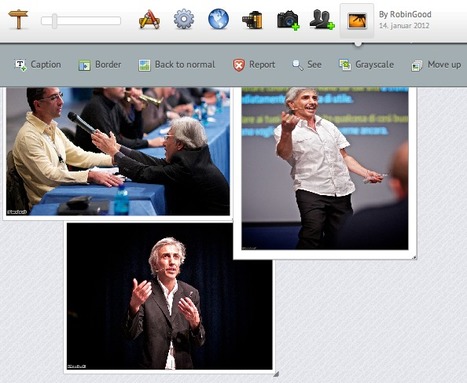
CanvasDropr provides a virtually infinite online canvas on which you and your friends / contacts can easily add, position, resize and rotate photos and video clips at will.
CanvasDropr can be used to brainstorm around visual collections, to select and organize images, and to prepare visual portfolios or tours to share with others or to be published online.
From the official site: "The center of the CanvasDropr idea is to work and collaborate on a so-called "Canvas".
The canvas can be shared by an unlimited amount of people, and changes made in the canvas are updated real-time in every user’s canvas.
Users can easily drag and drop new images directly from their desktop onto the canvas."
CanvasDrops allows you to text chat in real-time with other "collaborators" you have invited as well as to set permissions for what "public" users can edit or modify on a "public canvas.
It is possible to place photos and video clips coming from Facebook, YouTube, Flickr and Picasa or to import one simply by providing its URL.
The final canvas can be shared on FB or Twitter, downloaded as an "image" or a .zip file containing all of its images and can also be "embedded" on any site or blog.
Robin Good: The video opening titles for Museum140 (http://www.youtube.com/watch?v=ObLiikJEt94) have been created with a new tool that leverages the power of HTML5 to achieve results that are identical to those that you can achieve with Prezi, the alternative presentation tool.
Impress.js is a presentation tool inspired by the idea behind prezi.com and based on the power of CSS3 transforms and transitions in modern browsers.
Though Impress.js remains for now a tool for geeks and people who can use code, Impress.js heralds the upcoming legion of HTML5 presentation tools that will be likely start to rapidly grow in 2012.
Text, images and graphic elements can be easily positioned on a virtually infinite canvas in which they can be easily scaled, resized and positioned at will. Even a 3D rendering effect is available.
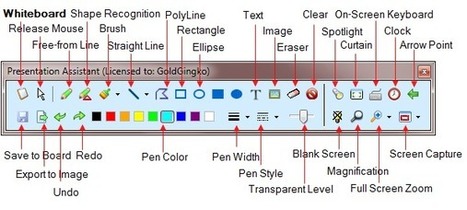
Presentation Marker is a Windows-only downloadable software utility which makes it easy to highlight, amrk-up, annotate and draw on any computer screen, on top of what is already being displayed.
This is a great tool for presenters, teachers and professional trainers who often need a toolkit to help them direct and focus attention of their students/viewers to specific parts of their screen.
Robin Good: Slidestaxx is a web-based service which allows anyone to easily create a shareable and embeddable visual slide-show by selecting and bringing together existing images, video clips, web sites and other content already available online.
My take: I like the idea of being able to produce presentations that contain properly "credited" third party content, but it would be even better to have these functionality integrated in your existing favorite presentation tool rather than elsewhere.
I think that this curation-presentation format suffers from the natural constraints of how we look at presentations. One slide at a time. I think that any curated-format benefits from providing the possibility to see both the detail and the larger picture and in this case I feel that the ability to see the presentation, also as an album, woud greatly benefit the value and benefits of this tool.
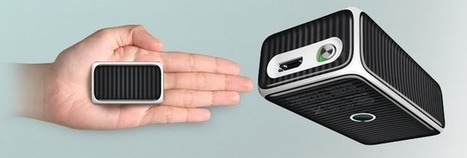
Sanwa has recently announced the availability of a slim mini portable projector that works in combination with your iPhone 4 or 4S.
The new Sanwa 400-PRJ011 is powered by its own 2,100mAh battery which happily can also charge your own iPhone battery.
The projector has an autonomy of five hours and can provide 2.5 hours of steady projection.
As you can see from the video, it is capable of projecting still or video images on any flat surface up to a size of 65-inches at 640 × 360 resolution.
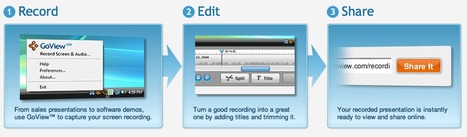
GoView is a screencasting tool which allows Windows PC users to capture their computer screen in one-click and to easily edit their screencasts.
GoView is as simple as it gets. After install, you are provided with a small icon on the bottom right of your screen. When you want to record what you see on your screen with your own audio commentary, you simply select the "Record Screen & Audio" menu selection and you are ready to go.
Once the recording is complete GoView provides with a very easy to use interface that simplifies greatly the process of editing and cleaning up the recording.
The final edited recording can be then easily saved and shared online with anyone.
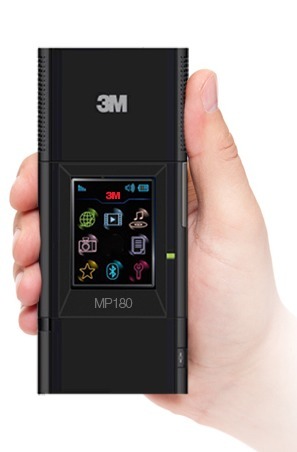
The 3M™ PocketProjector MP180 is a superportable data and image projector capable of 32 lumens and integrating 4GB of on-board memory as well as both bluetooth and WiFi connectivity.
The video resolutions supported by this portable porjector are VGA, SVGA, XGA, WXGA (1280x768). Battery life is apx. 2 hours.
The projected image can fill a screen up to 80 inches (though at that dimension the image is awfully dim-- 24 inches is about as big as you should go).
Input / output ports include: VGA, Composite Video, Component Video, USB Mini 2.0, Audio Out (3.5mm Stereo jack), microSD™ Card Slot.
The LED light source on the 3M PocketProjectors MP160 and MP180 can be used up to 20‚000 hours and there are no replacement lamps.
From the official site: Boxoft PDF to PPT Converter is a 100% free application to convert Adobe PDF files to formatted PowerPoint files.
If you are looking for a tool to convert un-editable PDF documents into act-like PowerPoint files, Boxoft PDF to PowerPoint could be a good choice for you.
The fast and easy converter is totally free software to batch convert your multiple PDF files into PPT format.
With it, you will get high quality Powerpoint slides rapidly with preserving the original PDF look and feel.
If you are looking for the easiest way possible to share a mockup design with someone else online, while having the opportunity to markup and annotate your work, here is the tool you may have been looking for: Mocku.ps
How it works: First you upload your artwork, which you can position on the screen using a special 9-slot grid, as well as a possible second image which can be used as background.
Then you can click and drag on the image to create caption boxes that highlight specific parts of the image and carry a specific note.
Each edited mockup has a unique URL which you can immediately share with your contacts.
InstantAtlas is a data presentation software for Windows PCs used to analyse, report and present statistical information on highly interactive maps.
"InstantAtlas enables information analysts and researchers to create highly-interactive dynamic and profile reports that combine statistics and map data to improve data visualization, enhance communication, and engage people in more informed decision making."
Direct hooks are built into InstantAtlas to operate with both Excel and Access data.
Mugeda is a cloud based HTML5 animation platform, where you can create, share, and publish organic HTML5 animation contents, all in your browser, without any download or installation.
The created animation content can be used in a wide range of applications like ads, games, tutorials, cartoons, and can be viewed on any devices including PC, smartphone, and tablets.
Mugeda provides a full web-based HTML5 animation editor in which to create, edit and refine your own visual productions.
Getting images for free is great, and there is a lot of choice out there, but sourcing images from a free site can have its drawbacks, the license that the images are provided with is different on every site you use. Some sites prohibit commercial use of the image, most require an attribution, some require you register or signup to a newsletter to access the images, some ask that you seek permission first etc.
A word of warning: Expecting that nobody will notice if you make use of an image that you just take without permission is foolish, tools like TinEye make it free and easy to find who has used an image without permission, and stock agencies like getty and others use paid services like picscout.com track image misuse, bill the offender, taking legal action if images are not removed. If you are using images without the correct license, someone will catch up with you sooner or later. here's a typical forum quote "I currently have a demand from getty images for $1200 over an image I hot-linked to in a blog entry 2 years ago."
With that in mind, here's our definitive list of resources providing free stock photos with a table of comparisons:...
SlideSnack is a suite of online presentation tools that converts your pdf into a flash presentation with voice-over record options and ability to share your slideshow on blogs and social networks.
Key features:
- Templates (more to come) - Share/embed online presentations - Share on YouTube (download as MP4) - Record voice over - Both HTML and Flash websites are supported - Unlimited number of online presentations/account - Download your online presentation or slidecast (SWF, MP4, EXE and APP) or use our hosting - Unlimited number of online presentations/account - Free unlimited hosting - Share easily on Facebook and other social networks
- Upload support for the following document types: JPG or PDF or import directly from a URL
- Slideshow max size: 500 slides/100MB
All the above features are free to use.
Premium service: for $14/month you also get the possibility to download the offline version of the player with no watermark.
P.S.: Free version embed codes and downloads options do contain a watermark. The free version of SlideSnack will apply a watermark or ads on your presentation or slidecast, and will only display 20 slides per presentation and 5 minutes per slidecast.
PresentationTube provides a video presentation desktop recorder (PC) to record, publish and share quality, accessible, and interactive video presentations.
PresentationTube synchronizes presenter's audio and video, PowerPoint slides, whiteboard, drawing board, and Web content.
PresentationTube also integrates a vertical thumbnail slider allowing the user to jump through presentation slides while keeping the video in sync.
Engagement options in each presentation include a discussion board and a self-assessment quiz.
The video part of each presentation can be uploaded to PresentationTube or imported straight from YouTube.
Presentations created with PresentationTube can be easily shared across social media networks as well as embedded on any site or blog.
Vocaroo is a web-based service which allows you to record your own voice and to publish it online or send it to someone via email.
Vocaroo is as simple as it can get. You click on the Record button and hit Stop when you are done. Your recording is immediately available, for email forwarding or for being embedded on any web site.
The recording is also available for immediate download in both .WAV and .Ogg audio formats.
Slidepoint is a free web-based presentation tool that integrates all of the functions and features o a standard presentation tool. It allows you to create basic presentations using text, graphics, videos and images that make no use of Flash.
The basic Slidepoint presentation editor offers all of the basic functionalities you would expect in a slide-show creation tool: - insert text and graphics - ready-made shapes
- insert list, tables
- insert YouTube, video, or questions module
- insert audio clip associated to a slide
- duplicate slides and objects
- front and back order of elements on a slide
- font size, style and color choice
- alignment of objects
- precise positioning
- transition effects and actions
- and most any other basic function you would expect
Each presentation created with SlidePoint can be easily shared on the major four social networks Facebook, Twitter, Linkedin and Google+ as well as being embedded on any site or blog.
Free accounts can create a maximum of 10 presentations and have a free storage space of only 25MB.
To gain more storage space or increase the limit of presentations that can be created, Slidepoint uses a reward system, that gives you more point as you perform more activities inside the service. Find out more here: http://www.slidepoint.net/a/account_rewards.php
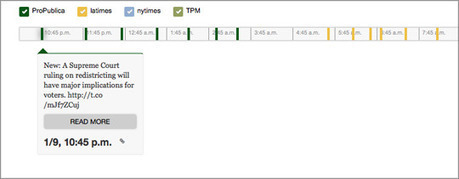
US investigative journalism news site ProPublica released to the public the code for its timeline tool, allowing all data journalists out there to create beautiful interactive timelines from their spreadsheets.
Sarah Marshall on Journalism.co.uk advises everyone not be scared by the tech stuff behind the tool itself, and encourages to try it out watching these two tutorial videos:
Logitech has just announced a new type of mouse that is as small as large pencil eraser, has no cables and can act as a perfect remote controller for presenters needing to manage the flow of their slides during a live event.
In fact, as the Cube is lifted from any surface on which it was resting, it auto-swtiches to "remote control presentation mode" allowing you to progress through your slide deck with a simple scrolling movement of your finger on it.
The tiny Logitech Unifying® receiver connects up to six Unifying-compatible devices with a powerful, reliable wireless connection (up to 25 meters). So the Cube works with your other Logitech Unifying devices without taking up another USB port.
Cube is an open-source system for visualizing time series data, built on MongoDB, Node and D3.
If you send Cube timestamped events (with optional structured data), you can easily build realtime visualizations of aggregate metrics for internal dashboards. (Cube has a handful of chart types that you can assemble into dashboards.)
For example, you might use Cube to monitor traffic to your website, counting the number of requests in 5-minute intervals.
Preseria Conference is a system which allows conference organizers to streamline the collection, delivery and post-event distribution of all presentation materials.
The system has been designed to eliminate typical problems caused by different event speakers having different types of files and requirements which are often handled at the very last minute.
With Preseria the organizer can invite speakers and presenters to submit their work in their preferred file format, and can then review and sequence the materials in whichever fashion.
After the event the organizer can decide who gets access to view the presentation materials and whether they can be viewed online and/or downloaded.
The Preseria system includes a desktop software component which runs on Widows PCs and which takes control of the final delivery of all presentation materials during the live event.
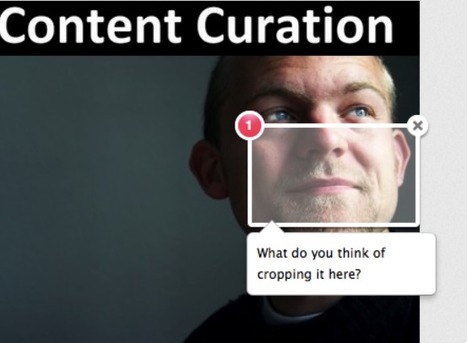
Awesome Screenshot is a super-useful Chrome extension I have just discovered and which does everything I expect from a screen-grabbing utility.
Awesome Screenshot can in fact grab either a full web page or a specific part of the screen that you select, while offering the additional treat of letting you save the captured image to your disk or to the cloud, so that you can share its url immediately.
Awesome Screenshot also lets you annotate and markup your just-captured images and it provides a useful "blur" tool, to make unreadable any part of a document or text that you may want not to show publicly.
Key features summarized:
1. Capture or clip selected area, or all visible portion, or entire page
2. Support PNG format
3. Support horizontal scroll when capturing
4. Annotate it with rectangles, circles, arrows, lines and text
5. Crop and scroll & Show crop area dimension
6. Use eraser to hide sensitive information
7. Copy the screenshot and paste it to gmail etc.
8. Save to local or one-click to upload to awesomescreenshot.com and get a shareable link
Thank YOU(!) Baiba for your excellent scouting and discovery work. If I had to list a curator that I am thankful for the many discoveries she has helped me make, it is definitely you.
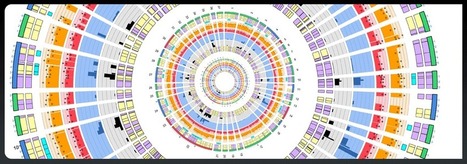
Circos is a software package conceived and created by Martin Krzywinski to visualize large amounts of data in a circular layout.
Circos is ideal for creating publication-quality infographics and illustrations with a high data-to-ink ratio, richly layered data and pleasant symmetries.
(You will need Perl to run Circos. Perl is an interpretive language, like Python or Ruby. It is available for nearly every operating system and if you're on UNIX or Mac OS X, you very likely already have it installed. Perl 5.8.x, or newer, is recommended.)
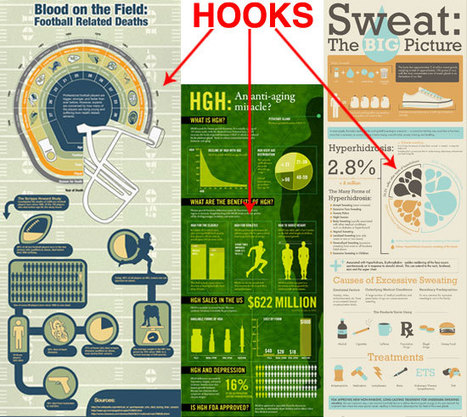
Infographics are visual representations of information, or “data viz” as the cool kids call it these days and here are some of the do's and don't when designing.
Shared Paper is an iPad presentation app which is based on a huge scrollable canvas.
"The name, “Shared Paper,” is apt. What you get is a huge zoomable canvas on to which you can draw, write and edit your thoughts and ideas. Then you can share that canvas with other iPad users on the same network."
"Your blank canvas stretches in four directions to each side, but also inwards, into itself. Objects can be hidden inside other objects, revealed when needed. A scale at the top of the screen shows where you are in the wider document – the canvas is finite, but it’s also huge.
You can embed images, add text, change colors and brush sizes, select and move and rotate any object at will. The controls are kept at your fingertips and are easy to learn.
To turn the document into a presentation, you can select preset views of your canvas to display as a slideshow. The slideshow transitions can be simple fades, or a snazzy fly-through that zooms from one place on the canvas to the next."
Completed presentations can be exported as PDFs or as documents or images.
Shared Paper is available in the App Store for $4.99
P.S.: There is also a free version: Shared Paper Lite.
This puts limits on your creating (25 objects in a document, and up to three documents at a time), but also gives people the chance to try the app, or to tune in wirelessly to shared presentations.
To get content containing either thought or leadership enter:
To get content containing both thought and leadership enter:
To get content containing the expression thought leadership enter:
You can enter several keywords and you can refine them whenever you want. Our suggestion engine uses more signals but entering a few keywords here will rapidly give you great content to curate.


 Your new post is loading...





![From PDF To PowerPoint: Boxoft PDF-to-PPT [Windows Freeware] | Presentation Tools | Scoop.it](https://img.scoop.it/az-9Oucv0FU_WDdOOY8qEjl72eJkfbmt4t8yenImKBVvK0kTmF0xjctABnaLJIm9)















A nice collaborative tool for images.